Most compliance risk comes from content that was never reviewed.

Review content where it already exists — from live web pages to in-progress assets — and catch issues before they spread. AI flags risks in real time and routes content into a governed workflow.

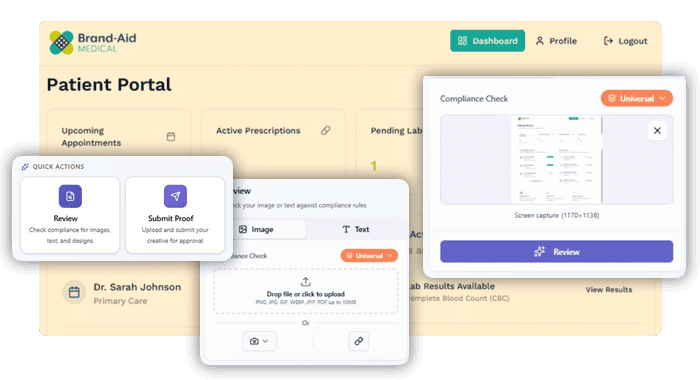
Screenshots of the Lytho Chrome extension inside a brand-aid patient portal.

Watch how it works

Check content for brand and compliance without leaving your workflow. Lytho’s Chrome extension brings AI reviewers into the tools your teams already use, flagging issues early and guiding fixes before anything goes live.

Find Lytho’s Chrome extension in the Chrome Web Store

Content goes live without review every day.

Without in-the-wild governance
Content is published across websites, landing pages, and channels without review. Issues are caught late—or not at all—and there is no clear record of what was checked.
With Lytho’s Chrome Extension
Teams can review content directly where it appears, flag issues in real time, and route it into a governed workflow. Every check is documented, creating a clear, audit-ready record.

Capture, review, and route content instantly

Check content directly from live pages and send it into governed workflows.

Select live pages, components, or assets directly from your browser.

Bring governance to every browser-based tool

Check content across any tool
Review websites, CMS platforms, and other browser-based tools in real time.
See issues before they spread
Identify brand and compliance risks before content is widely distributed.
Route content into workflows
Send flagged content into Lytho for structured review and approval.
Maintain a clear record
Track checks, findings, and approvals across every asset.

Govern content wherever it appears

Check content in the wild
Review live pages and published content to catch issues that never entered a formal workflow.
Apply standards beyond your tools
Enforce brand and compliance rules across any browser-based environment, not just inside core systems.
Capture and route instantly
Send content directly into Lytho Workflow for review and approval when issues are found.
Create audit-ready records anywhere
Document checks, findings, and approvals, even for content outside your core workflows.

Frequently-asked questions about Lytho’s Chrome extension

Can Lytho’s Chrome Extension review content for compliance inside the tools my team already uses to create it?

Yes — and this is the core reason the extension exists. Most compliance risk accumulates before content ever reaches a formal review process. By the time an asset enters a structured approval workflow, the team has already invested significant time in content that may need to be reworked.

The Lytho Chrome Extension brings AI Reviewers directly into any web-based tool — a CMS, an email builder, a landing page platform, a web-based design tool — so compliance checks happen at the moment of creation. The extension scans content in real time against your configured brand and compliance rules, flags issues, suggests fixes, and logs what was reviewed. No switching tools, no waiting for a formal review cycle to begin.

For teams in healthcare or financial services, this means a content creator can get an immediate read on whether a disclaimer is missing, a claim is non-compliant, or a brand rule has been violated — and fix it in seconds rather than days. The Chrome Extension is also how Lytho extends compliance coverage to content that lives entirely outside the platform, closing the gap between governed workflows and the reality of how content actually gets made.
What does the Lytho Chrome Extension actually check for, and how does it know our brand rules?

The Chrome Extension is trained on your organization’s brand guidelines and compliance rules — the same rules configured in Lytho’s platform. When an AI reviewer scans a live web page, a CMS draft, or any content visible in Chrome, it flags issues against those specific standards: wrong logo usage, off-brand color or font, missing disclaimers, prohibited language, outdated product claims. It’s not a generic spell checker — it understands your brand and your regulatory environment.

Is the Chrome Extension only useful before content goes live, or can it help after publication too?

Both. Pre-publication, it can be used as a final check inside a CMS, email builder, or landing page tool before anyone hits publish. Post-publication, it can scan live pages for compliance drift — content that was accurate when it went live but is now outdated, or pages that were published without going through a formal review process. For organizations with large web presences, distributed content contributors, or frequent regulatory updates, the ability to scan published content is often as valuable as the pre-publication check.

How does the Chrome Extension fit into a governed review process? Can it route content back into Lytho?

Yes. When the Chrome Extension identifies issues in content, it can route that content directly into a Lytho workflow for formal review and remediation. This closes the loop between content that exists “in the wild” — on a live website, in a CMS, or in a third-party tool — and your governed approval process. For marketing directors who worry about content that was published without going through proper review, the extension provides a mechanism to catch and correct it after the fact, and to establish a process for pre-publication review going forward.

Catch issues before they become risk

Review content in real time, reduce compliance risk, and ensure every asset is ready to go live.